
Guides · Remote work
Internet, Wifi & Remote Work in Nairobi: A 2026 Guide
Internet, Wifi & Remote Work in Nairobi: A 2026 Guide
Nairobi is a genuinely good place to work remotely. Home fibre is fast and cheap, mobile data is inexpensive, satellite internet now reaches almost anywhere, the coworking scene is strong, and the time zone lines up neatly with US working hours. Locals call the city the “Silicon Savannah” for good reason — connectivity is one of the things that surprises newcomers most, in a good way. The one thing to design around is power: keep a backup, and you’re set.
This guide covers everything a remote worker needs: home internet providers and current speeds, the new Starlink option, mobile data and 5G, the backup-power question, how much speed you actually need, the best coworking spaces, which neighborhoods suit remote work, and how the time zone helps. It’s written for digital nomads and remote employees weighing Nairobi as a base, and the numbers are current as of mid-2026.
The quick version
Home fibre is the backbone of remote work in Nairobi. After a market-wide upgrade in 2026, the common tiers run about 40 to 150 Mbps for roughly $23–50 a month, with gigabit available if you want it — plenty for video calls and heavy uploads. Starlink satellite internet is now widely available too (around $31–50 a month) and is a strong backup or a primary connection where fibre hasn’t reached. Mobile data is cheap and 5G is live across the city, so a Safaricom or Airtel SIM makes an easy failover. The real planning point is power: outages happen, so choose a home or building with a backup generator, or run a UPS, to keep your calls alive. Coworking is excellent (Nairobi Garage, Ikigai and others), and at UTC+3 your Nairobi afternoon overlaps the US East Coast morning. For longer stays, look at the Class N digital nomad permit.
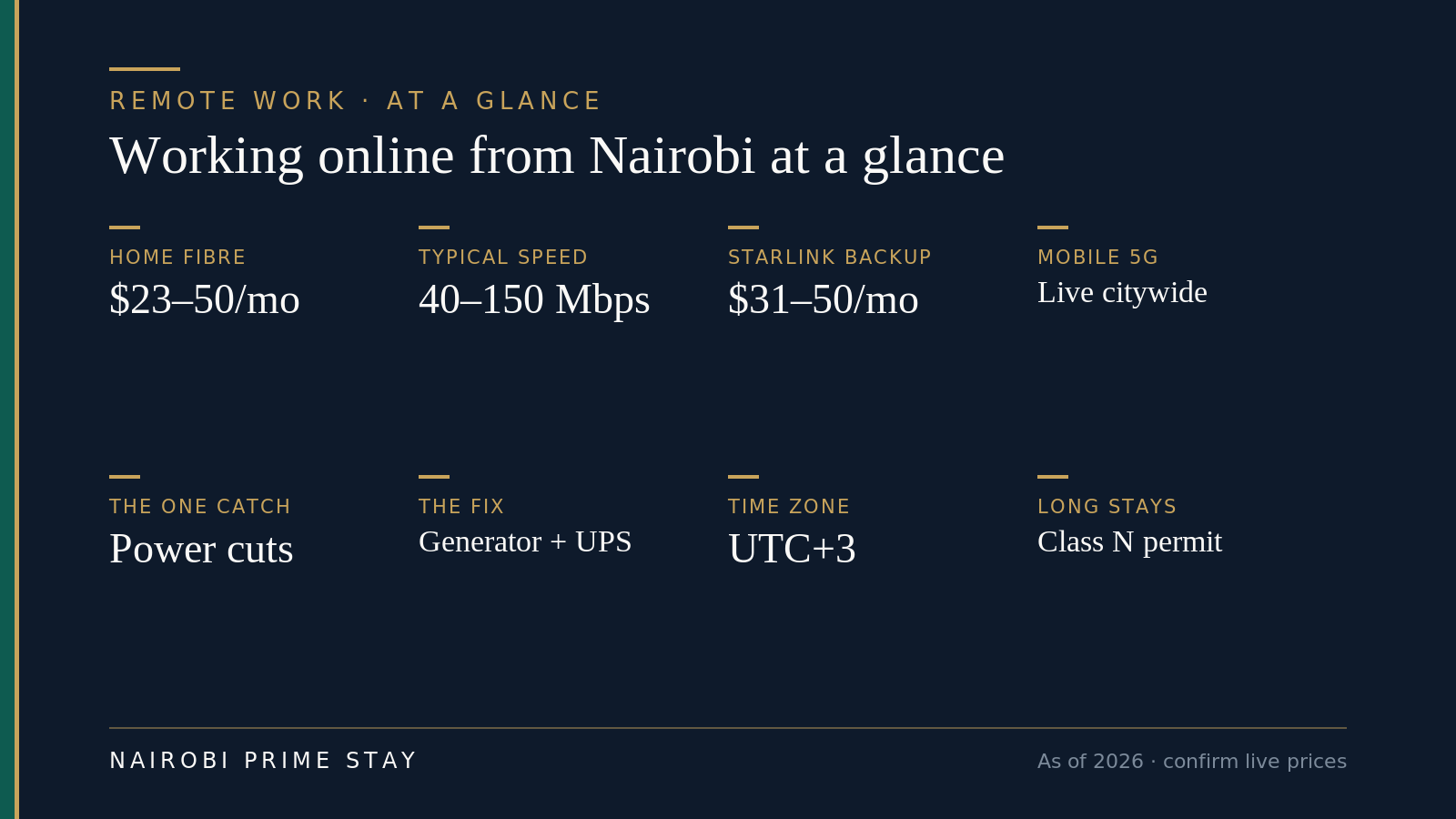
The shape of remote work in Nairobi, on one screen.
Is the internet good in Nairobi?
Yes — better than most people expect. Nairobi is one of the best-connected cities in Africa, with widespread fibre, real competition between providers, satellite as a backstop, and a tech ecosystem that depends on good connectivity. For everyday remote work — video meetings, large file transfers, cloud tools — a home fibre connection handles it comfortably. This isn’t a compromise you’re tolerating to live somewhere cheap; the connectivity genuinely works.
The caveat that matters isn’t speed, it’s continuity: occasional power cuts can take your connection down unless you’ve planned for backup. Sort that, and you have a reliable, fast setup. We’ll cover the fix below.
Home fibre: providers, speeds and prices
Home fibre is your main connection, and it’s a buyer’s market. Several providers compete hard, which keeps prices low and speeds climbing. In early 2026 the biggest provider, Safaricom, upgraded every tier — in some cases more than doubling speeds at the same price — and the others followed. The result is that you get noticeably more for your money now than even a year ago.
Here are Safaricom Home Fibre’s tiers as a reference point, current as of mid-2026. Zuku and Faiba (JTL) price and perform similarly, so treat this as the shape of the market rather than the only option. (USD figures use roughly KES 130 to the dollar — see our cost of living guide for the wider budget picture.)
| Tier | Speed | Price (KES/mo) | Approx. USD | Good for |
|---|---|---|---|---|
| Entry / “Lite” | ~15 Mbps | ~1,500 | ~$12 | One person; email, browsing, light calls |
| Standard | ~40 Mbps | ~2,999 | ~$23 | A solid single remote worker — HD calls and uploads |
| Mid | ~60 Mbps | ~4,100 | ~$32 | A couple both working from home |
| Fast | ~150 Mbps | ~6,299 | ~$49 | Heavy uploads, big files, a busy household |
| Power | ~500 Mbps | ~12,499 | ~$96 | Creators, large transfers, many devices |
| Top | ~1 Gbps | ~20,000 | ~$154 | Everything, fully future-proofed |
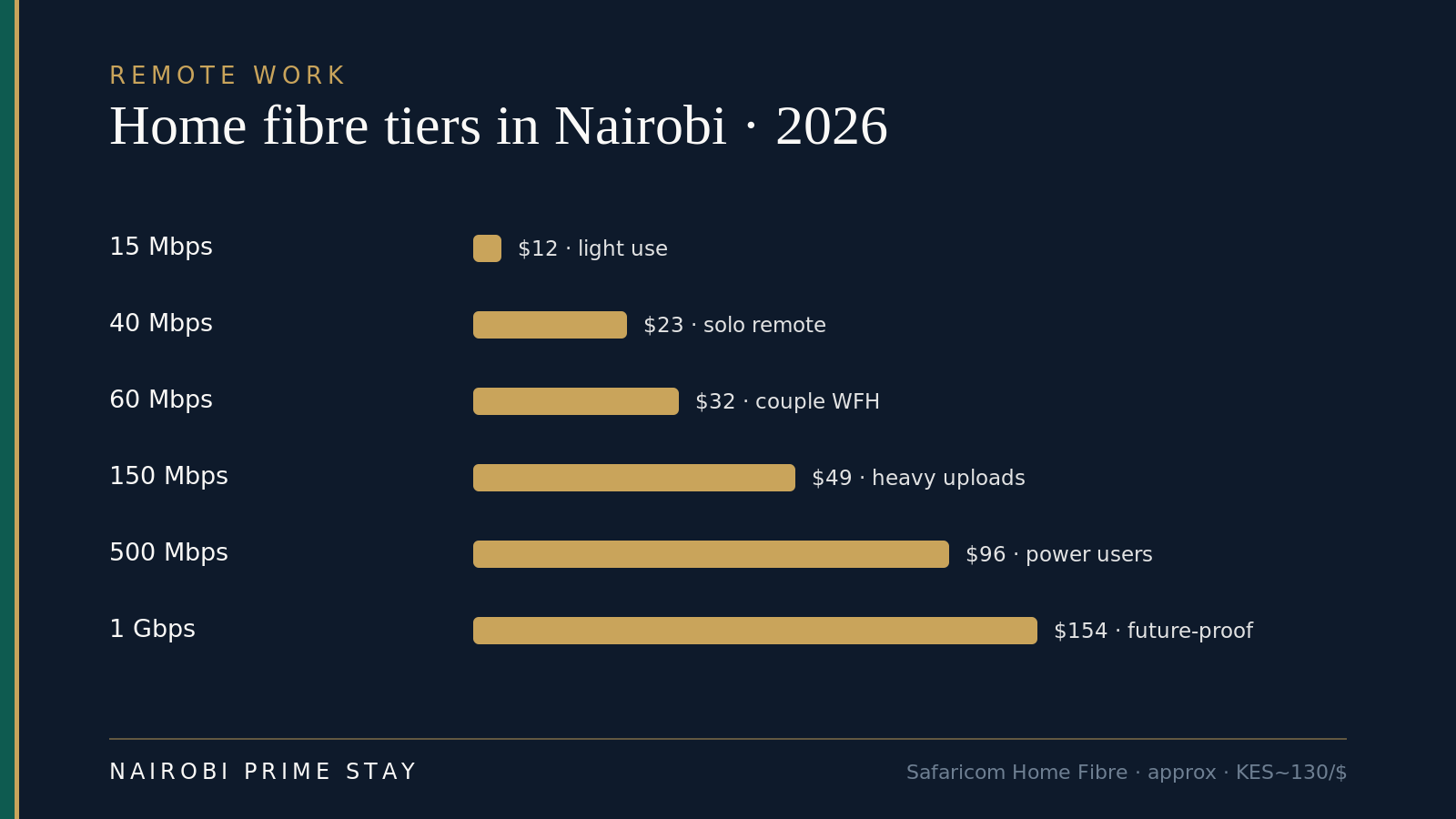
Home fibre tiers and indicative prices (2026).
For most remote workers, the ~$23–50 range (40–150 Mbps) is the sweet spot. Installation is usually free and a router is included. Two honest caveats worth knowing. Most home plans run on a shared “contention ratio” — Safaricom’s is 1:4, so the speed you actually get can dip toward a quarter of the headline at the busiest evening hours. And there’s a fair-usage cap (around 7 TB a month on Safaricom), so normal work won’t come close, though a heavy 4K-streaming household might. One bit of good news: an April 2026 upgrade roughly doubled most tiers at the same price, so if your plan predates it, ask your provider to move you up for free.
The single most important thing to check before you rent a home is whether fibre from a good provider already serves that specific building. Coverage is street by street, and you don’t want to discover after moving that installation will take weeks. Ask the landlord or building manager, confirm with the provider, and ask for the upload speed too — it matters as much as download for calls and file sharing. A serviced apartment sidesteps all of this, since fast Wi-Fi is already installed and included — see our serviced apartments guide.
Starlink: satellite internet as backup or primary
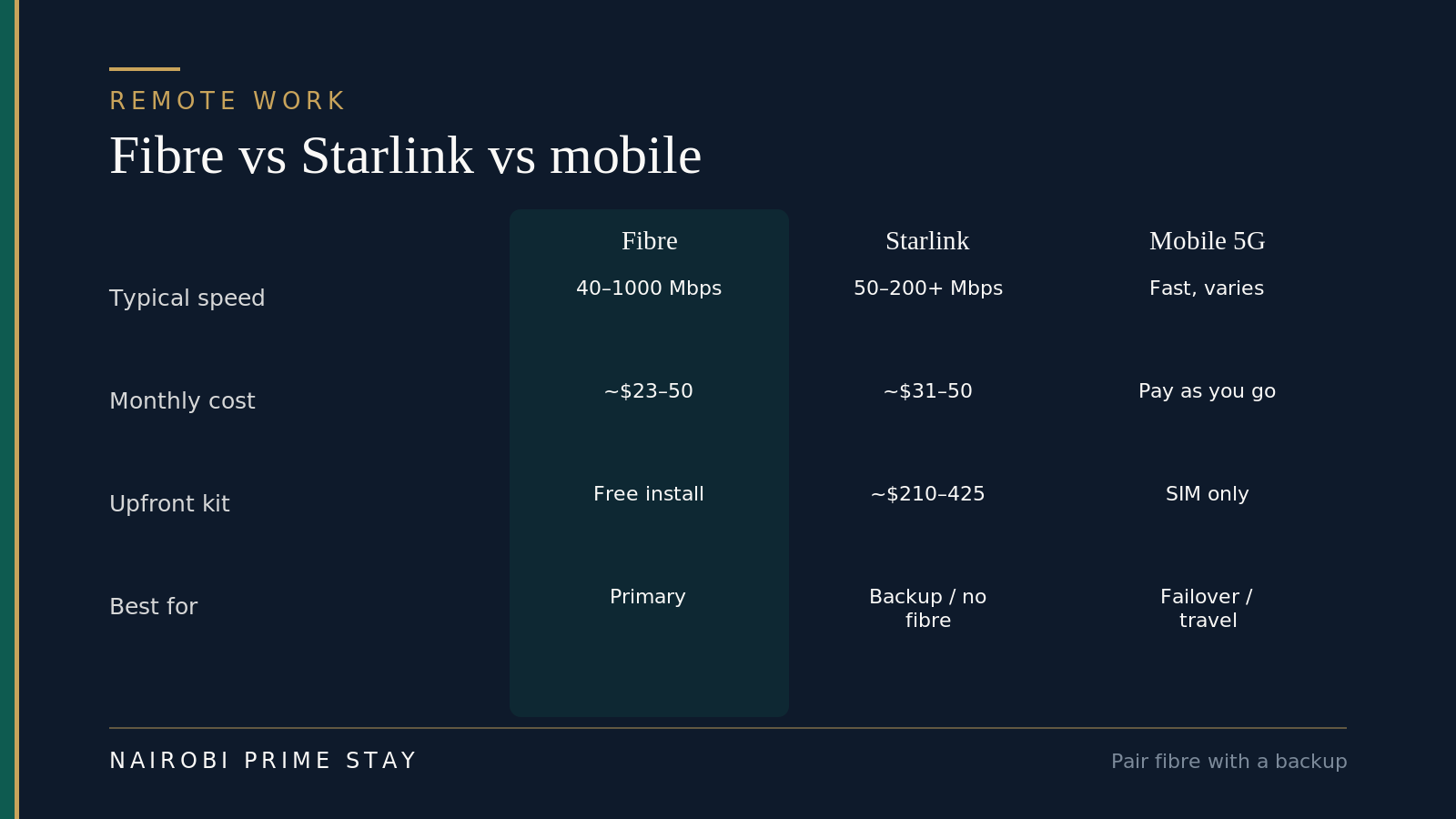
Pick a primary connection, add a backup.
Starlink is now a real option in Nairobi, and it changes the calculus for reliability. As of 2026 it’s available across Kenya wherever you have a clear view of the sky, with residential plans around KES 4,000 a month (~$31) for the lighter tier and KES 6,500 (~$50) for standard residential. Real-world speeds typically land between 50 and 200+ Mbps with low latency, which is comfortable for video calls.
The catch is the hardware: the kit runs roughly KES 27,000–55,000 ($210–425) up front, though Starlink introduced instalment plans in Kenya in 2026 to soften that. For a short stay it rarely makes sense. But it’s worth knowing about for two situations: if you’re renting somewhere fibre hasn’t reached (less common in the prime suburbs, but it happens), or if your work simply cannot tolerate downtime and you want a second, independent connection. Pairing fibre with a Starlink or mobile backup is how people who run mission-critical calls from Nairobi sleep at night.
Mobile data, 5G and SIMs
Mobile data in Kenya is cheap and fast, which makes it the easiest backup for your home connection — handy during an outage or when you’re on the move. Pick up a Safaricom or Airtel SIM (or an eSIM) shortly after arrival. Safaricom has the widest coverage, and registering also sets you up with M-Pesa, the mobile-money system that runs daily payments here.
5G is live across Nairobi — Safaricom has rolled out more than 1,100 5G sites nationwide and cut the price of 5G routers to compete with satellite — so a 5G SIM or a 5G home router can deliver fibre-like speeds in covered areas. Many remote workers tether to mobile data as a failover during power cuts, which together with a charged laptop keeps a call going. Bring an unlocked phone so you can drop in a local SIM, and buy a monthly data bundle rather than paying as you go.
A few practical notes. Registering a SIM is quick, but you’ll need your passport — it’s a legal requirement, so do it at an official Safaricom or Airtel shop, not a street kiosk. Monthly data is cheap by US standards: a generous bundle costs a few dollars, and there are unlimited-data options if you tether heavily. If you’d rather land already connected, an eSIM (Safaricom supports it, or a travel eSIM like Airalo) gets you online the moment you clear the airport, and you can switch to a full local SIM with M-Pesa once you’ve settled in. For moving between home, a coworking desk and meetings, see how the city actually gets around in our getting around Nairobi guide.
The power question — and how to solve it
Here’s the one genuine planning point for remote work in Nairobi: electricity outages happen, and a power cut will take down your Wi-Fi router unless you’ve prepared. Outages aren’t constant, but they’re frequent enough that you should plan for them rather than hope. The good news is the fix is simple, standard, and a one-time decision.
- Choose a building with a backup generator. Many quality apartments and serviced apartments have one that kicks in automatically within seconds, so your power and internet barely blink. This is part of the “Nairobi Five” to check before renting — generator, water storage, 24/7 security, fibre already installed, and responsive management.
- Run a UPS or inverter for your router and laptop as a personal backup. Even a modest UPS buys you enough cushion to finish a call gracefully or ride out a short cut.
- Keep mobile data ready to tether if both fail. With 5G in the city, this fallback is genuinely fast.
Layer these and outages become a non-issue. It’s the difference between remote work in Nairobi feeling smooth or occasionally frustrating, and it comes down mostly to your choice of building. Our moving to Nairobi guide flags this in the wider home-hunting checklist.
How much speed do you actually need?
Don’t overpay for speed you won’t use — but don’t cut it so fine that two simultaneous calls choke. As a rough guide for remote work:
| What you’re doing | Comfortable download speed |
|---|---|
| Email, web, messaging | 5–10 Mbps |
| One HD video call (Zoom, Meet, Teams) | 5–15 Mbps |
| Two people on calls at the same time | 25–40 Mbps |
| Large uploads, video editing, cloud backup | 50+ Mbps |
| A full household — streaming, gaming, work | 100+ Mbps |
A 40 Mbps plan is plenty for one serious remote worker. A couple who both take calls should look at 60–150 Mbps. The number people forget is upload speed: video calls and file sharing lean on it, so confirm the upload figure with the provider, not just the headline download.
Coworking spaces in Nairobi
If you’d rather not work from home — or want guaranteed power and some company — Nairobi’s coworking scene is excellent. These spaces offer fast Wi-Fi, backup power, meeting rooms and a community of founders, freelancers and remote workers, and they’re a great way to have a reliable base from day one, before your home internet is sorted.
| Space | Where (broadly) | Style |
|---|---|---|
| Nairobi Garage | Westlands, Kilimani | Professional, startup-heavy; meeting rooms, events, good for networking |
| Ikigai | Lavington, Karen, Riverside, Westlands | Calm, design-led, garden settings; flexible memberships |
| Cafés & smaller hubs | Across the western suburbs | Casual solo work and day passes |
Day passes, hot desks and dedicated desks are all typically available, so you can match the commitment to your stay. For many newcomers, a coworking membership in their first weeks doubles as a social network and a fallback office — and a guaranteed place for that one call you can’t miss.
For the full rundown — every major space by area, current day-pass and membership prices, and the best laptop cafés — see our dedicated coworking spaces and cafés guide.
Working from cafés
Beyond dedicated coworking, cafés in the western suburbs are laptop-friendly, especially across Westlands, Kilimani, Lavington and Karen, with good coffee and reliable Wi-Fi. Java House and Artcaffe are dependable chains with branches almost everywhere, plenty of plug sockets and staff who don’t mind a long stay; independents like Connect Coffee in Lavington draw a regular laptop crowd. They’re fine for focused solo work and casual calls.
The honest caveat is the same one that governs everything here: power and noise. Café Wi-Fi rides the same grid as everyone else, so in an outage you’re back on your phone’s data, and an open room is no place for a call you can’t afford to drop. Use cafés for heads-down work and quick check-ins, and keep the meetings that matter for a well-powered home or a coworking booth. Buy something, tip, and you’ve got a pleasant change of scene for the price of a flat white.
Best neighborhoods for remote workers
Remote workers tend to favor the central, social suburbs — the ones with the densest fibre, the most coworking a short hop away, and cafés you can walk to. Kilimani offers modern apartments and the best value among the prime areas; Westlands puts you in the thick of offices, coworking and nightlife; Riverside is central but calmer and leafier, which suits long focused days. All three are well served by fibre and coworking and keep you close to cafés and amenities. Families working remotely often prefer the space of Lavington or Karen — bigger homes, gardens, and room for a proper office.
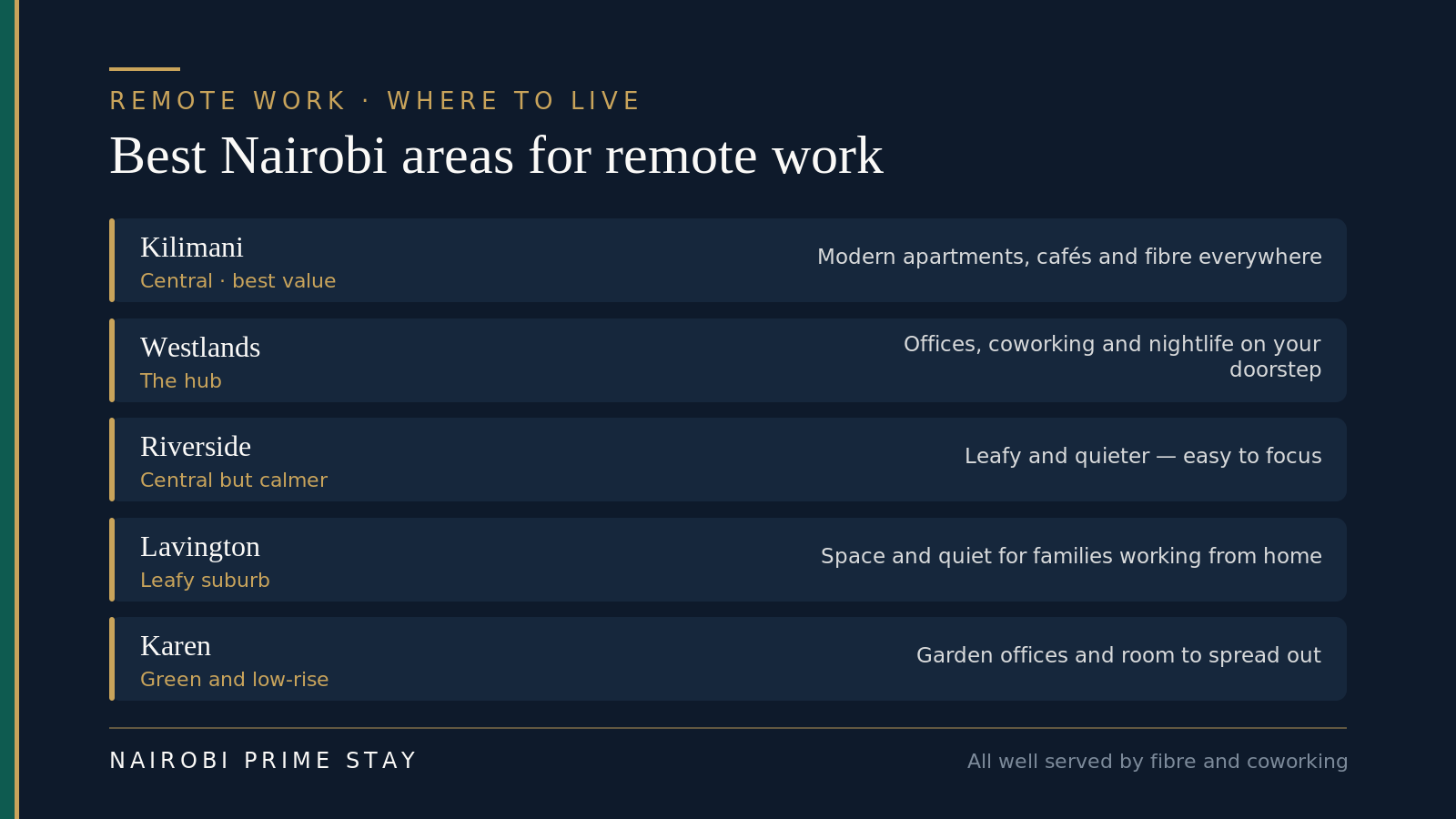
Where remote workers actually base themselves.
Whichever you choose, the building matters more than the postcode: confirm fibre is already installed and there’s a backup generator before you sign. Compare the areas in depth in our best neighborhoods guide, and let our AI relocation assistant match a connected, well-powered apartment to your work needs.
The time-zone advantage
Nairobi runs on East Africa Time (UTC+3), which works unusually well for remote roles tied to the US. Your Nairobi morning is heads-down focus time while the US sleeps, and your afternoon overlaps the US East Coast morning — so you get a solid block of real-time collaboration without working through the night.
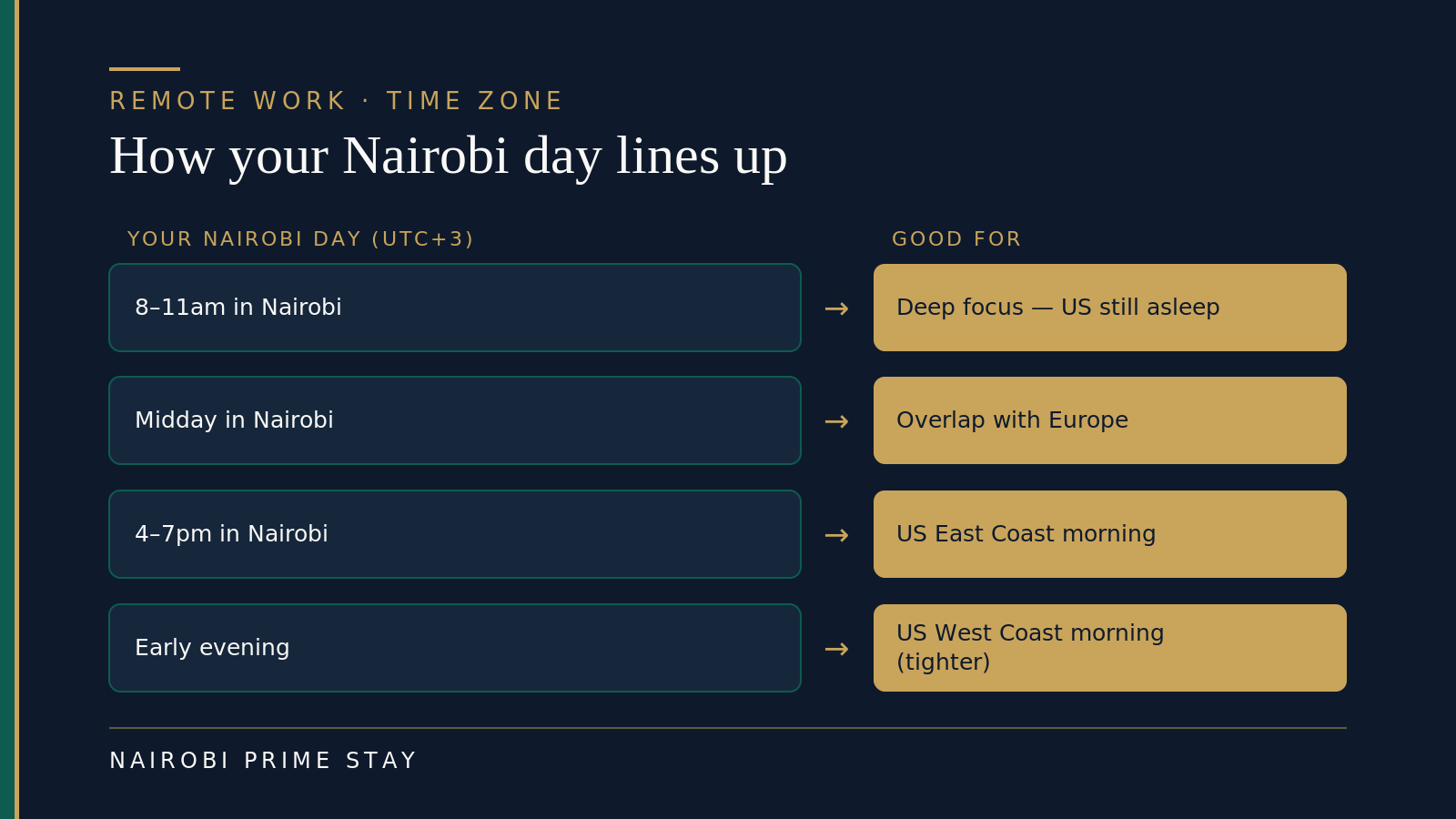
East Africa Time is kind to transatlantic teams.
Be honest with yourself about which coast you’re serving. The East Coast (UTC−4/−5) is the sweet spot — a 7–8 hour gap means your afternoon is their morning. The West Coast (UTC−7/−8) is a 10–11 hour gap, so the overlap is tighter: your early evening catches their morning, fine for a daily stand-up but not a full day of shared hours. European clients are easier still, with most of the working day in common. It’s a comfortable rhythm for transatlantic teams, and a genuine reason Nairobi suits American remote workers better than many other global bases. If you’ll be here a while, a community of people keeping the same odd hours helps — see our expat community guide.
If you’re staying long-term: the digital nomad visa
For a short scouting trip you don’t need anything special: Americans enter on an approved eTA (Kenya’s electronic travel authorization), and nothing stops you answering email or taking calls for your foreign employer while you’re a visitor. That’s the easy way to test-drive Nairobi before you commit.
For actually living here, Kenya’s Class N digital nomad permit is built for remote workers paid from abroad. As of 2026 it costs around $200 to process plus $1,000 a year, and runs one to two years. The income bar has moved — it launched asking about $55,000 a year and was later cut to a $24,000 minimum — and recent guidance leans on showing steady foreign income (roughly three months of bank statements or payslips) rather than hitting one fixed number. The permit lets you live here legally while working for foreign employers or clients; you just can’t take local Kenyan work on it. A spouse and children come along on a dependant’s pass.
The sequence most remote workers use: enter on the eTA, land in a serviced apartment for the first month, and have a lawyer file the Class N while you find a longer-term home. The full picture is in our Kenya visa guide for Americans, and you should confirm the current fee and income requirement on the official eFNS immigration portal (fns.immigration.go.ke) before you rely on it — these rules change.
A quick remote-work setup checklist
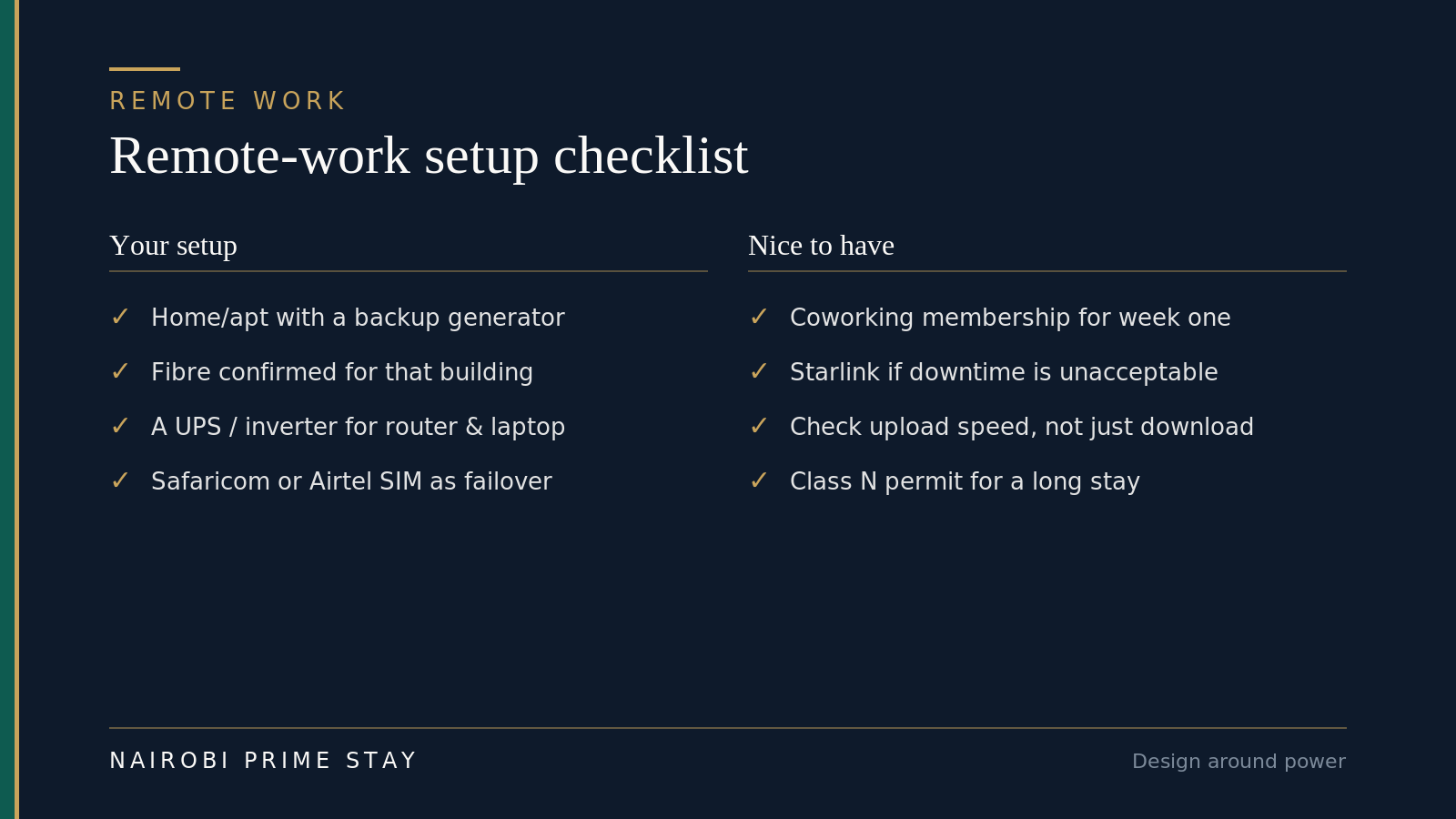
Design around power.
- Choose a home or serviced apartment with a backup generator and fibre already installed.
- Confirm the fibre provider, download and upload speed for that specific building before signing.
- Pick up a Safaricom or Airtel SIM/eSIM on arrival as a data backup (and to set up M-Pesa).
- Add a UPS or inverter for your router and laptop.
- If your work can’t tolerate downtime, consider a second connection (Starlink or 5G) for redundancy.
- Consider a coworking membership for your first weeks (and reliable calls).
- If staying long-term, plan your Class N permit early.
Frequently asked questions
Is the internet fast enough in Nairobi to work remotely? Yes. Home fibre commonly delivers 40 to 150 Mbps from providers like Safaricom, Zuku and Faiba, with gigabit plans available — plenty for video calls, large uploads and cloud tools. The thing to plan for is power continuity, not speed: pick a building with a backup generator so outages don’t interrupt your day.
How much does home internet cost in Nairobi? Roughly $23 to $50 a month for the popular 40–150 Mbps fibre tiers (about KES 3,000–6,300 with Safaricom in 2026). Budget “Fibre Lite” plans start near $12 a month, and a 1 Gbps connection runs about $155. Most remote workers are very comfortable on a mid-tier plan around $30–40.
Which is the best internet provider in Nairobi? There’s no single best — it depends on what’s already wired to your building. Safaricom Home Fibre has the widest coverage and a strong reliability reputation; Faiba and Zuku often undercut it on price. Before you sign a lease, ask which providers serve that exact building and what speed they deliver there, not just citywide.
Is Starlink available in Nairobi, and is it worth it? Yes, Starlink works across Nairobi. As of 2026 the residential service runs about KES 4,000–6,500 a month (roughly $31–50), with the hardware kit around KES 27,000–60,000 ($210–465) and installment payment plans now available. It’s overkill if your building already has solid fibre, but it’s an excellent backup — or a primary connection in newer suburbs where fibre hasn’t reached.
How do I keep working through Nairobi’s power cuts? Plan around them and they’re a non-issue. Choose a building with a backup generator, add a small UPS or inverter so your router and laptop ride through the gap before the generator kicks in, and keep mobile data as a failover. Serviced apartments usually bundle the generator, which is why many remote workers start there. Power continuity — not raw speed — is the real thing to solve.
Do serviced apartments in Nairobi include Wi-Fi and backup power? Almost always, yes. A good serviced apartment is all-inclusive: fibre Wi-Fi, a backup generator, security, cleaning and utilities in one monthly price. It’s the simplest way to land with a working connection from day one. Still confirm the actual fibre speed for the unit — see our serviced apartments guide for what to check.
What upload speed do I need for video calls? Less than you’d think — about 3 to 4 Mbps upload is enough for a smooth HD call on Zoom or Google Meet, a little more if you screen-share or stream. Any standard Nairobi fibre plan clears that easily. The catch is that some plans advertise download speed and skimp on upload, so ask for the upload figure on the specific building before you commit.
Does the Nairobi time zone work for a US remote job? It works well. Nairobi is on East Africa Time (UTC+3). Your morning is quiet focus time while the US sleeps, and your afternoon overlaps the US East-Coast morning — a solid block of real-time collaboration without working nights. For European clients the overlap is even bigger.
Which Nairobi neighborhoods are best for remote work? The central, social suburbs win on fibre, coworking and walkable cafés. Kilimani is the best-value pick for solo workers and couples; Westlands puts you next to offices, coworking and nightlife; Riverside is central but calmer for focused days. Families who work from home often prefer the space of Lavington or Karen. Wherever you land, confirm fibre is already installed and the building has a backup generator.
Do I need a special visa to work remotely from Nairobi? For a short stay, no — you enter on Kenya’s eTA and can work for your foreign employer while you’re a visitor. To live here long-term, the Class N digital nomad permit is the proper route: about $200 to process plus $1,000 a year, for remote income earned abroad. You can’t take local Kenyan work on it. Confirm the current rules on the official eFNS portal before relying on them.
Final thoughts
Nairobi is a genuinely easy place to work online. The fibre is fast and cheap, the time zone is kind to American and European teams, and the coworking scene is real. The thing that trips people up isn’t bandwidth — it’s power. Solve for a backup generator and a simple UPS, keep a SIM as failover, and you’ll barely notice the grid. Set that up once and Nairobi quietly becomes one of the better remote-work bases anywhere.
Related reading
- Moving to Nairobi: the complete guide — the hub that ties the whole move together.
- Best neighborhoods in Nairobi — where remote workers actually live.
- Cost of living in Nairobi — how internet, power and rent add up.
- Serviced apartments in Nairobi — all-inclusive, with fibre and a generator built in.
- Kenya visa guide for Americans — including the Class N digital nomad permit.
When you’re ready, browse our serviced apartments in Nairobi — each comes with fibre Wi-Fi and a backup generator, so you can work from the first morning. A $50 deposit reserves a place and you settle the balance on arrival. Not sure which area fits your hours and budget? Our AI relocation assistant can shortlist options in a couple of minutes, any time of day.
Ready to look?
Find your apartment in Nairobi
Browse verified serviced apartments, or ask the AI concierge which area fits your life.